
BusinessSetu software and its implemented modules are permanently free. Customer prices, invoices and payment records remain intact. Separate provider charges may apply under your chosen terms; individually agreed custom work is separately quoted.
The five-field metadata card
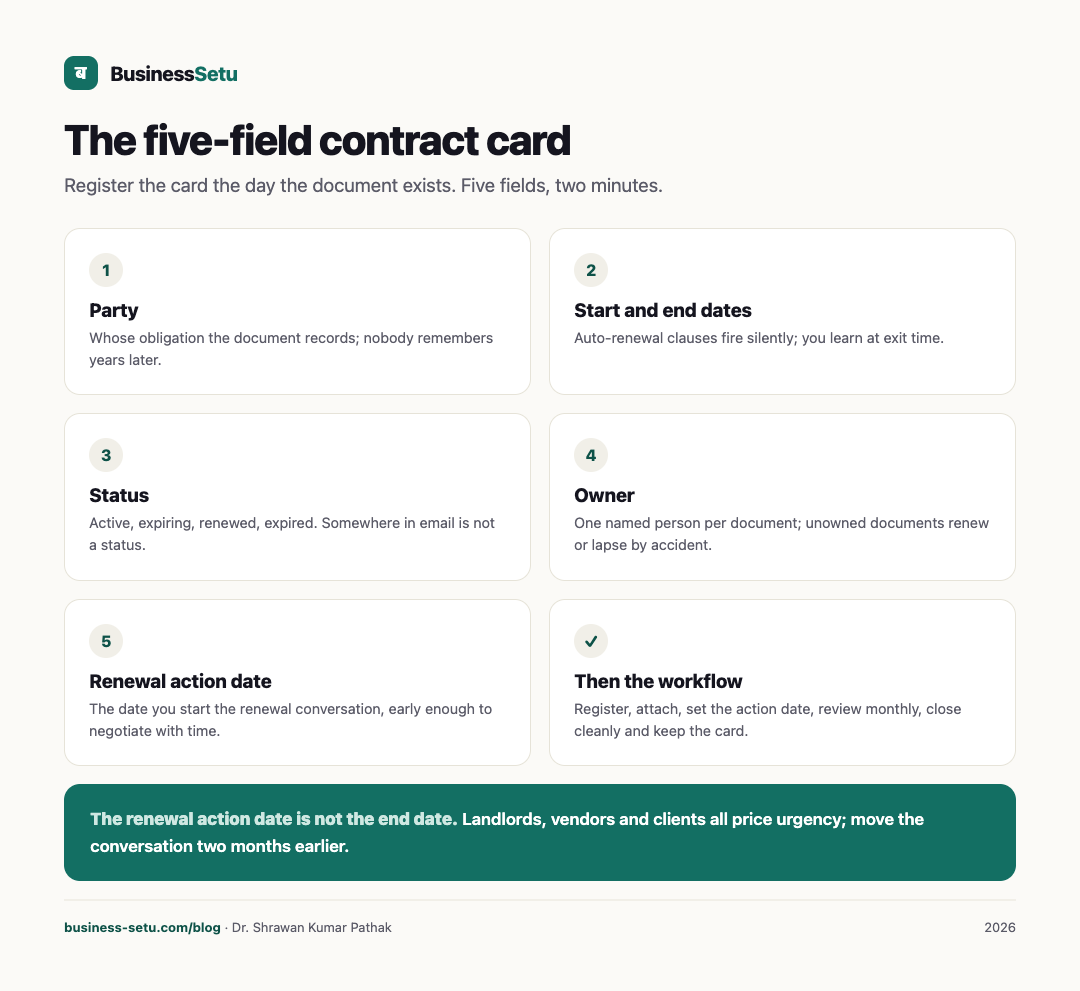
For each contract or document, one card:
| Field | Example | What goes wrong without it |
|---|---|---|
| Party | Cloud kitchen landlord | The document exists but nobody remembers whose obligation it records |
| Start and end dates | 1 April to 31 March | Auto-renewal clauses fire silently; you learn at exit time |
| Status | Active, expiring, renewed, expired | "Somewhere in email" is not a status |
| Owner | You, or a named person | Unowned documents renew or lapse by accident |
| Renewal action date | 15 February, 45 days early | Renewal negotiated in a hurry is renewal negotiated badly |
The renewal action date deserves emphasis. It is not the end date. It is the date you must start the renewal conversation, early enough that you are not negotiating against your own deadline. Landlords, vendors and clients all price urgency.
What counts as a trackable document
Beyond signed agreements: shop lease, vendor supply terms, machine annual maintenance contracts, insurance policies, licences and permits with expiry dates, GST and PAN-related records your accountant asks for, warranty documents, and staff appointment letters. The test is simple: if a date on it passing unnoticed would cost money or peace, it belongs in the tracker.
The five-step records workflow
- Register. The day a document exists, its card exists. Five fields, two minutes.
- Attach. Keep the file with the card, named simply: party, document type, year.
- Set the renewal action date. For auto-renewing contracts, also note the notice window for exit, the date by which you must say you are leaving.
- Review on a fixed rhythm. A monthly five-minute look at everything expiring in the next 90 days catches what daily busyness hides.
- Close cleanly. When a contract ends, mark it expired and keep the card. Old contracts answer questions that arrive years later, like a warranty claim against a lapsed AMC.
The renewal that pays for the habit
Picture a small manufacturer whose machine maintenance contract auto-renews each year at a rate the vendor raises quietly. This is an illustration, not a case study. With no tracker, the renewal letter arrives after the increase has taken effect and the conversation starts from "already committed". With a renewal action date 60 days early, the owner compares two vendors, negotiates with time in hand, and either renews on better terms or plans the switch. The tracker did nothing clever. It moved one conversation two months earlier, and that is where its entire value lies.
Access: who should see what
Contract records carry prices, salary terms and negotiation history. Three rules keep access sane:
- Need to know by default. The owner sees everything; staff see the documents their work depends on.
- Separate the sensitive. Staff appointment letters and your own lease terms do not belong in the same visibility circle as routine vendor documents.
- Respect personal data. Contracts name people, so under India's Digital Personal Data Protection Act they involve personal data. BusinessSetu's privacy pages note that data is stored in India, can be exported from Settings, and account closure removes account data within 30 days. Whatever tool you use, keep it one where you can get your documents out.
Fit and non-fit
A records-first contract tracker fits when:
- Your documents number in the tens, not thousands.
- The owner or one manager is the main user.
- The pain is dates, status and findability, not drafting.
It stops fitting when you need clause-level search across hundreds of agreements, approval chains before signing, e-signature workflows, or version comparison between drafts. The BusinessSetu site claims none of these. The use-cases page also keeps deep approval flows outside the product today. When your contract process needs workflow engineering rather than record keeping, that is custom software territory, and Big Helpers builds document-workflow systems with a written scope, a fixed INR range and code handed over at launch.
One boundary worth repeating: this article is records advice, not legal advice. For what a contract should say, or whether to sign one, see a lawyer.
Frequently asked questions
What does the Contracts add-on include?
BusinessSetu software and its implemented modules are permanently free. Customer prices, invoices and payment records remain intact. Separate provider charges may apply under your chosen terms; individually agreed custom work is separately quoted.
Does it support e-signature?
No e-signature capability is claimed anywhere on the site. Signatures stay outside the tool, on paper or through a dedicated signing service.
Will it remind me before expiry?
Reminder specifics for contracts are not described on the public pages. Test the behaviour in the free workspace, and keep your own monthly 90-day review rhythm regardless.
Can I store scans and photos of documents?
Verified storage behaviour on the site covers expense receipt photos in Core. For contract file attachments, verify in the free workspace before relying on it.
Who in my business should update the tracker?
One named owner per document, with the business owner as the fallback. Shared nobody-owns-it trackers decay within a quarter.
Start with the documents that can hurt you
List the five documents whose surprise expiry would cost you the most, and give each one the five-field card this week.
BusinessSetu software and its implemented modules are permanently free. Customer prices, invoices and payment records remain intact. Separate provider charges may apply under your chosen terms; individually agreed custom work is separately quoted.
For how your documents are protected, read the security page and the privacy notice.