
Track advances and part payments with one running record per order: the total value at the top, then one dated row for every receipt, and the balance due recalculated after each one. Never overwrite a past entry, never keep the balance in your head, and check the whole ledger once a week. That single structure, kept honestly, answers the three questions that sink small orders: who paid, how much, and what remains.
One order, one ledger
The unit of tracking is the order, not the customer and not the month. A customer with three running orders has three separate balances; a month with forty receipts still has one row per receipt per order. Each row carries four things:
- Date the money arrived.
- Amount received.
- How it came: UPI reference, bank transfer, cash.
- What it was: advance, milestone, balance, refund.
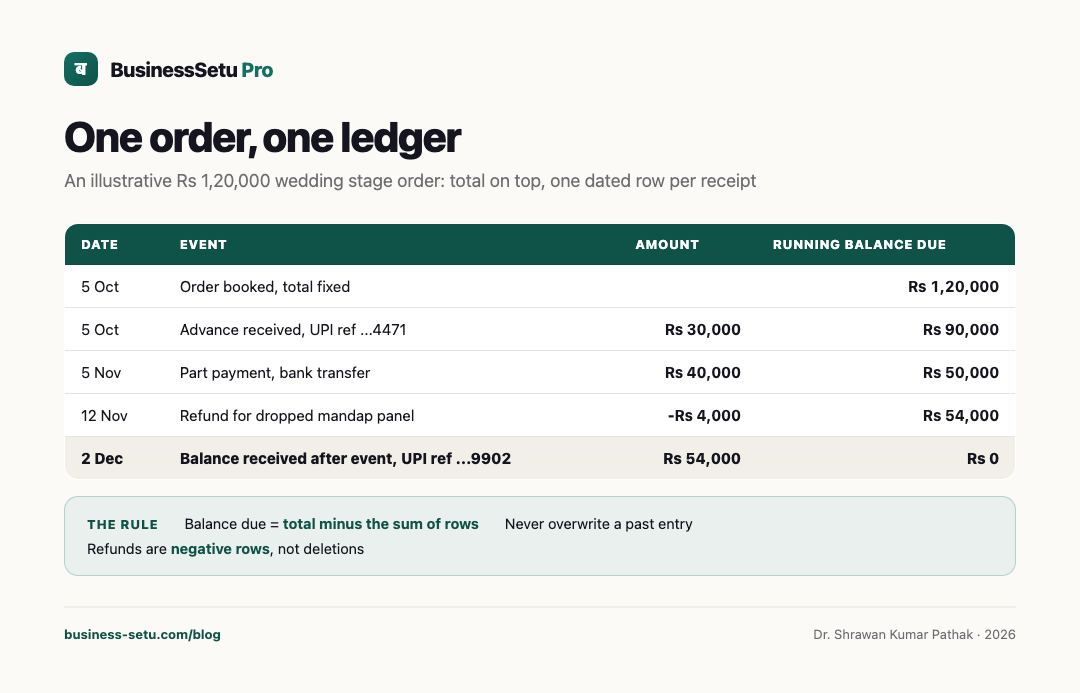
The balance due line is always total minus the sum of rows. If you ever find yourself typing a new balance over an old one, stop; you are erasing the evidence that protects you.
A worked example, labelled as such
Illustrative example, not a real customer. An event manager books a wedding stage order worth Rs 1,20,000 on 5 October, with the agreed rhythm of an advance at booking, a part payment a month before, and the balance on the day.
| Date | Event | Amount | Running balance due |
|---|---|---|---|
| 5 Oct | Order booked, total fixed | Rs 1,20,000 | |
| 5 Oct | Advance received, UPI ref ...4471 | Rs 30,000 | Rs 90,000 |
| 5 Nov | Part payment, bank transfer | Rs 40,000 | Rs 50,000 |
| 12 Nov | Refund for dropped mandap panel | -Rs 4,000 | Rs 54,000 |
| 2 Dec | Balance received after event, UPI ref ...9902 | Rs 54,000 | Rs 0 |
Two details do the quiet work. The refund is a negative row, not a deletion, so the history still shows the original order value. The final receipt is recorded against the specific order, so the settled balance is a fact rather than a feeling. When the family asks in January for a payment summary, the answer is five rows, not an evening of chat-scrolling.
Rules that keep the thread from snapping
- Record within the hour of receiving money. Memory degrades faster than owners expect.
- One reference per row. A UPI reference or transfer note is what turns a claim into proof.
- Advances get agreed dates for the next payment, written into the record, not just spoken.
- Refunds and adjustments are negative rows with a one-line reason.
- Cash payments get the same dated rows as digital ones, with the word cash noted.
None of these rules need software. All of them need consistency, which is where paper usually loses.
The weekly reconciliation checklist
Once a week, ideally the same evening each week, spend fifteen minutes:
- Match every bank and UPI credit this week to a ledger row. Unmatched credits get investigated, not assumed.
- Match every ledger row that claims digital money to an actual statement entry. Rows without credits are wishes.
- List every order with a balance over seven days old, with the promised next payment date.
- Check that no order shows a negative balance, which usually means a receipt was recorded twice or against the wrong order.
- Confirm upcoming week milestones and the advances supporting them have reminder dates set.
Fifteen minutes weekly replaces the four-hour scramble that untracked balances produce at month-end, and it is the difference between asking for money and negotiating about memory.
When the spreadsheet starts lying
Spreadsheets are honest until two people edit them, or one tired owner edits them at 11 pm. The failure signs are familiar: two versions of the same file, a formula overwritten by a typed number, balances that disagree with the bank, and payments entered against the customer instead of the order.
BusinessSetu software and its implemented modules are permanently free. Customer prices, invoices and payment records remain intact. Separate provider charges may apply under your chosen terms; individually agreed custom work is separately quoted.
Where owners lose the thread
- Recording the advance but never the promised dates for the rest.
- Treating a screenshot of a transfer as a recorded payment; the row must exist in the ledger too.
- Adjusting balances verbally on delivery day and updating the record "later".
- Splitting one received amount across two orders without noting the split.
- Keeping the ledger in a chat window with the customer, where it scrolls away within days.
- Never reconciling, so every balance is "approximately" and every collection conversation starts from doubt.
Frequently asked questions
Is an advance the same as income?
That is a tax treatment question, and it depends on your registration and accounting method. For tracking purposes, record the advance as a dated receipt; for tax treatment, ask a qualified professional.
How do I handle a customer who overpays?
Record the actual amount received, carry the excess as a negative balance, and either refund it or apply it to the next order with the customer's written okay.
What if a payment arrives with no reference and no note?
Record the date, amount and channel, then message the customer the same day asking what the payment was for. Guessing creates silent errors.
Should refunds delete the original rows?
No. Enter the refund as a negative row with a reason. The order's history should be able to explain itself years later.
How many orders before I need more than a spreadsheet?
The trigger is not count but friction: when reconciliation takes more than thirty minutes or balances disagree with the bank twice in a month, move to a purpose-built tool.
Put it into practice
BusinessSetu software and its implemented modules are permanently free. Customer prices, invoices and payment records remain intact. Separate provider charges may apply under your chosen terms; individually agreed custom work is separately quoted.